- Ensure the device is charged. If not it will take about 1-2 hours to charge them
- Ensure there are spare AA batteries. Each controller takes 2 batteries.
- A WIFI connection is required in the room to be used.
First time set up for patient
- Choose a location, consider patient comfort & safety.
- Choose a comfortable seated location for the patient to use the headset, ideally next to a small table so the controllers can be placed there.
- It is important to be in the same position as the patient will be in, in order to set the VR boundary correctly.
- In a scenario where it is impractical for the clinician to sit in the same spot as the patient, eg the patient’s bed, the patient can set up the boundary using the simple instructions provided in the headset.
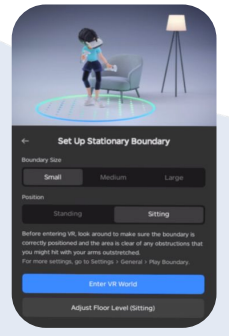
- Set the VR boundary
- Follow the instructions provided in the headset (and above) to set the boundary.
- If instructing the patient how to set the boundary, tell the patient to always select Stationary, Large, & Sitting as their VR boundary options.
Once you have set the boundary, the headset will remember the location if you use it again in the same location. You will then only need to select Enter VR world using current boundary.