• Home
  • Chronic Pain Distraction
  • Stress Reduction
  • Partners
  • Featured In
  • Scientific Advisors
  • Research Papers
  • Sign up
  • Home
  • Chronic Pain Distraction
  • Stress Reduction
  • Partners
  • Featured In
  • Scientific Advisors
  • Research Papers
  • Sign up

Let’s work together

Like our work? Arrange a meeting with us at our office, We'll be happy to work with you!

Wanna join our crazy team?

We are always looking for new talents and we were expecting you. Time to apply, buddy!

  • Home
  • Chronic Pain Distraction
  • Stress Reduction
  • Partners
  • Featured In
  • Scientific Advisors
  • Research Papers
  • Sign up

Recent Posts.

  • Mindfulness with Prof. Mark Williams September 6, 2022
  • Bringing the healthy mind platter to VR September 5, 2022
  • VR and Mindfulness September 5, 2022
  • VR and Relaxation September 5, 2022
  • A VR wellness tracker September 2, 2022
  • Home
  • Chronic Pain Distraction
  • Stress Reduction
  • Partners
  • Featured In
  • Scientific Advisors
  • Research Papers
  • Sign up

Pico Neo 3 Headsets

⌘K
  • Setting Up
  • St Francis Hospice
    • Giving Instructions to Patient
      • Show the headset to the patient
      • Help the patient put on the headset.
    • Set up WIFI
    • Support and Troubleshooting
      • How do I find the menu when I’m in Shine VR?
      • How do I recenter the menu?
      • How do I add a new WIFI network?
    • Using ShineVR
      • End of session
      • How to use Shine VR
      • Video help
      • Cleaning
      • Charging
      • Storage & Care
      • Updates
  • How to connect to WiFi
    • Circle Health Trial
  • How to set up a boundary on the Pico Neo 3 from start-up
  • Navigation
  • How to Use Shine VR
    • Welcome and Setup
    • Quiet Space
    • Relaxation Space
    • Game Space
    • Educational Space
    • Levitation Space
  • How to Exit
  • Power On & Battery Status
  • FAQ & TroubleShooting
  • The VR screen is fuzzy or hard to focus
  • How do I adjust the volume on my VR headset
  1. Home
  2. Pico Neo 3 Headsets
  3. St Francis Hospice
  4. Support and Troubleshooti...
  5. How do I find the menu when I’m in Shine VR?

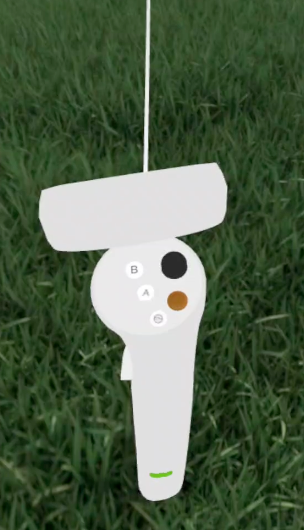
How do I find the menu when I’m in Shine VR?

While you are using Shine VR, look down at your controller in virtual reality you will see the menu button is coloured orange. 

This is the button with a single line  on your controller.

Doc navigation

How do I recenter the menu? →
Still stuck? How can we help?
Updated on May 7, 2026
Was this article helpful to you? No Yes

How can we help?

  • Home
  • Chronic Pain Distraction
  • Stress Reduction
  • Partners
  • Featured In
  • Scientific Advisors
  • Research Papers
  • Sign up
  • Policies
  • User Guide
  • Data Deletion Request

Download our apps


Download on the App Store


Get it on Google Play


Get it on Google Play

© Copyright 2025 | vStream Digital Media Limited

ShineVR is not a Medical Treatment. ShineVR does not provide any medical advice, diagnosis or engage in the practice of medicine. The Services are not intended to be and do not constitute a substitute for professional medical advice, diagnosis, or treatment.

  • LinkedIn