There is no specific end time – you can use whichever spaces and activities you find helpful for as long as you feel comfortable. We recommend using Shine VR for approximately 15 min a day if possible or whenever you feel a flare-up of pain or stress. Your time in VR is shown on the right panel and the purple ring will close when you have completed 15 minutes.
When you are ready to finish, bring up the menu by pressing the ‘line’ button (1 horizontal line) on your controller. You can see it marked on the controller images for your headset: Pico Headsets or Meta Quest Headsets
Then choose the Exit button circled below.
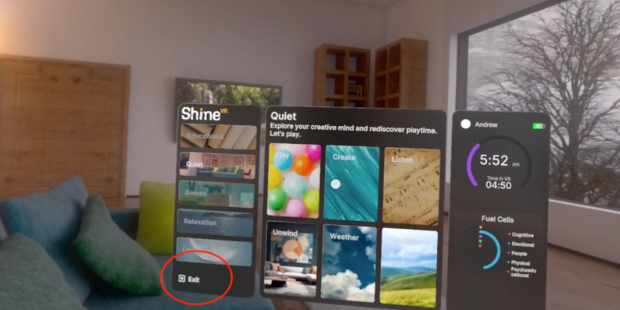
You should then see the stress or pain scale to choose from, and you can pick your score.
Then choose Next.
You will then see the login screen again which means you have successfully signed out.
- Turn off each device by pressing the power button on top of the headset and hold for 5 seconds.
- Wipe down the headset.
- Put the headset back in the case.
- Attach the charging USB cable to the headset and plug in.
- Put the controllers in the case, try to not have a button be pressed as this may drain their batteries.