1) Power On & Battery Status
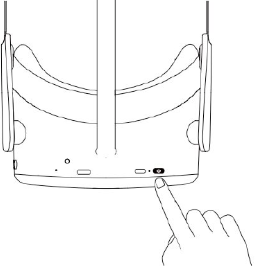
The POWER button can be pressed to:
- Power on: long press for 2 seconds
- Power off: long press for 5 seconds
- Short press to enter sleep or wake up
Next to the POWER button there is an indicator light showcasing the status of the headset:
🔵 Solid blue: Powered on, battery above 20%
🟡 Yellow: Charging (battery not full yet)
🟢 Green : Fully charged / almost full
🔴 Red: Low battery (below ~20%)
🔵 🔵 Flashing blue: Shutting down
⚫ No light: Sleeping or powered off
Ensure battery is fully charged before use.
After turning it on, you should see a Pico logo appearing on screen.
Now put the headset on.